
ServiceNow Integration Best Practices: Building Scalable and Reliable Enterprise Workflows
Modern enterprises use multiple platforms for IT operations, HR management, monitoring, security, and customer support. The real challenge is not just using these tools – it is making them communicate efficiently with each other.
This is where ServiceNow integrations become extremely powerful.
From automating incident creation to synchronizing enterprise data across systems, ServiceNow integrations help organizations reduce manual work, improve operational efficiency, and enable intelligent workflows.
Having worked on real-world ServiceNow integrations, one thing becomes very clear: building an integration is easy, but building a scalable, secure, and maintainable integration is what truly matters.
In this blog, we will explore:
- Types of ServiceNow integrations
- Common integration methods
- Best practices for enterprise implementations
Understanding ServiceNow Integrations
A ServiceNow integration is the process of connecting ServiceNow with external systems or applications to exchange data automatically.
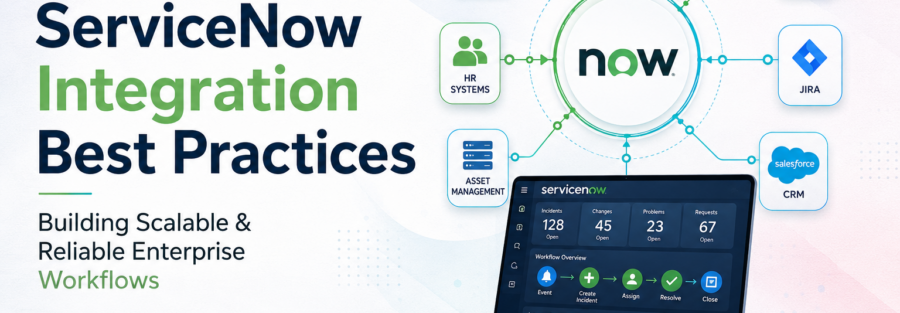
Organizations commonly integrate ServiceNow with:
- Monitoring tools
- Cloud platforms
- HR systems
- CRM applications
- Collaboration platforms
- Asset management systems
Popular examples include:
- Microsoft
- Salesforce
- Amazon Web Services (AWS)
- Jira
The primary goal of integration is simple:
Enable systems to work together without manual intervention.
Types of ServiceNow Integrations
ServiceNow integrations are mainly categorized into three types based on communication direction.
1. Inbound Integrations
Inbound integrations occur when external systems send data into ServiceNow.
Examples:
- Monitoring tools creating incidents automatically
- HR systems sending employee onboarding data
- External applications updating ServiceNow records
Common Technologies:
- REST APIs
- SOAP APIs
- Email integrations
- Import Sets
Real-World Example
A server monitoring tool detects high CPU usage and automatically creates an incident in ServiceNow using REST APIs.
This helps operations teams respond faster without manual ticket creation.
2. Outbound Integrations
Outbound integrations occur when ServiceNow sends information to external systems.
Examples:
- Sending notifications to collaboration platforms
- Updating external CMDB systems
- Triggering automation workflows
- Sending incident updates to third-party applications
Common Technologies:
- REST Messages
- SOAP Messages
- IntegrationHub
- Webhooks
Real-World Example
When an incident is resolved in ServiceNow, the resolution details are automatically updated in an external monitoring platform.
3. Bidirectional Integrations
In many enterprise scenarios, systems continuously exchange data in both directions.
Example:
ServiceNow to Jira synchronization
If a ticket is updated in Jira, the changes reflect in ServiceNow and vice versa.
These integrations require:
- Proper field mapping
- Conflict handling
- Synchronization logic
- Duplicate prevention mechanisms

ServiceNow Integration Best Practices
1. Prefer Out-of-the-Box Solutions
One of the biggest mistakes developers make in ServiceNow integrations is creating custom solutions for everything. Before building custom APIs or scripts, always check whether IntegrationHub spokes, ServiceNow Store applications, prebuilt connectors, or existing APIs are already available. Out-of-the-box solutions are better tested, easier to upgrade, officially supported, and much easier to maintain in the long run.
2. Design Integrations for Scalability
A small integration built today can become a critical enterprise integration tomorrow. That is why integrations should always be designed with scalability in mind. Avoid tightly coupled systems, use reusable APIs, separate business logic properly, and follow modular architecture wherever possible. A scalable integration design reduces future rework and improves maintainability as business requirements grow.
3. Secure Every Integration
Security should always be a top priority while building integrations. Instead of using hardcoded usernames and passwords, use secure authentication methods like OAuth 2.0. Always use HTTPS communication and create dedicated integration users with only the required roles and permissions. Following the principle of least privilege helps reduce security risks and protects sensitive enterprise data.
4. Use MID Servers for On-Premise Systems
When integrating ServiceNow with internal enterprise systems, MID Servers play an important role. MID Servers act as secure bridges between ServiceNow and on-premise infrastructure without exposing internal systems directly to the internet. Maintaining multiple MID Servers for redundancy and monitoring their health regularly helps improve reliability and availability in enterprise environments.
5. Implement Proper Error Handling and Logging
Good logging and error handling make troubleshooting much easier during real-world production issues. Every integration should log important details such as request payloads, response payloads, HTTP status codes, timestamps, transaction IDs, and error messages. Retry mechanisms and alerting systems should also be implemented to avoid silent failures and improve operational stability.
6. Avoid Heavy Synchronous Processing
Long-running synchronous integrations can negatively impact platform performance and user experience. Instead of processing everything synchronously, it is better to use asynchronous Business Rules, Events, Scheduled Jobs, Queues, or Flow Designer actions. This reduces transaction timeouts and helps the platform handle large workloads more efficiently.
7. Prevent Duplicate Record Creation
Duplicate records are one of the most common integration challenges in enterprise systems. External applications may accidentally trigger APIs multiple times, leading to duplicate incidents, requests, or assets. To prevent this, integrations should use correlation IDs, duplicate validation checks, coalesce fields in Transform Maps, and unique identifiers such as ticket numbers or employee IDs.
8. Use Import Sets for Bulk Data Operations
For large-scale data imports, directly inserting records into production tables is not recommended. ServiceNow Import Sets and Transform Maps provide better validation, transformation, rollback capability, and cleaner data processing. This approach improves data quality and makes bulk operations easier to manage.
9. Monitor Integrations Continuously
Integrations should never be treated as “set and forget” implementations. Continuous monitoring is necessary to identify failed transactions, slow API responses, queue backlog issues, MID Server problems, or scheduled job failures. Monitoring areas such as System Logs, Transaction Logs, and Flow Execution History help maintain stable and reliable integrations.
10. Maintain Proper Documentation
Documentation is often ignored during development but becomes extremely important later for troubleshooting, onboarding, and future enhancements. Every integration should include architecture diagrams, API details, authentication methods, field mappings, retry mechanisms, and error handling workflows. Good documentation improves collaboration and makes integrations easier to maintain over time.
Final Thoughts
ServiceNow integrations are much more than simple API connections. They are the backbone of enterprise workflow automation.
A successful integration strategy should focus on:
- Scalability
- Security
- Reliability
- Maintainability
- Performance
- Monitoring
A well-designed integration can save countless hours of manual effort, reduce operational risks, and significantly improve business efficiency.